
What is Yaklip?
Yaklip is an AI storyboard generator that takes your idea through frames, clips and an animatic export.
Published
Updated
What does Yaklip do?
Yaklip is an AI storyboard generator for creators and small video teams. You type one sentence. Yaklip writes the shots, makes a reusable cast and locations, and draws the frames in your chosen look. You can turn a frame into a short video clip, time the frames as an animatic, and export a PDF or an MP4.
What does Yaklip measure with analytics?
Yaklip uses Google Analytics to understand visits, new accounts, Quick Start, finished storyboards and clips, plan choices and purchases. These events are sent both from your browser and from our server, so they still count when an extension blocks analytics, and each event is sent only once. A first-party cookie keeps the source of your first visit so it survives signing in. The identifier we send to Google for your account is a one-way code, never your email or account ID. We remove sign-in secrets and free-text fields from analytics URLs and replace project and asset IDs with route patterns. We do not send your email, name, prompts or project titles in these events. See Privacy for details.
Can I start from a guide, article or example?
Yes. After the opening answer, the Try Yaklip box explains Yaklip and shows the current free offer. Edit the example in Your idea, then choose Start free to open Quick Start. This does not generate a storyboard; sign in, choose your settings and review the idea first.
How does an idea become a storyboard?
- Idea → Quick Start: type a sentence and choose a look.
- Script: review or develop your script and shot breakdown in the editor.
- Characters, Backgrounds and Props: choose the reusable people, places and objects for your shots. Story Quick Start creates cast and locations. Ad Quick Start also creates a reusable product prop; add other props in the editor.
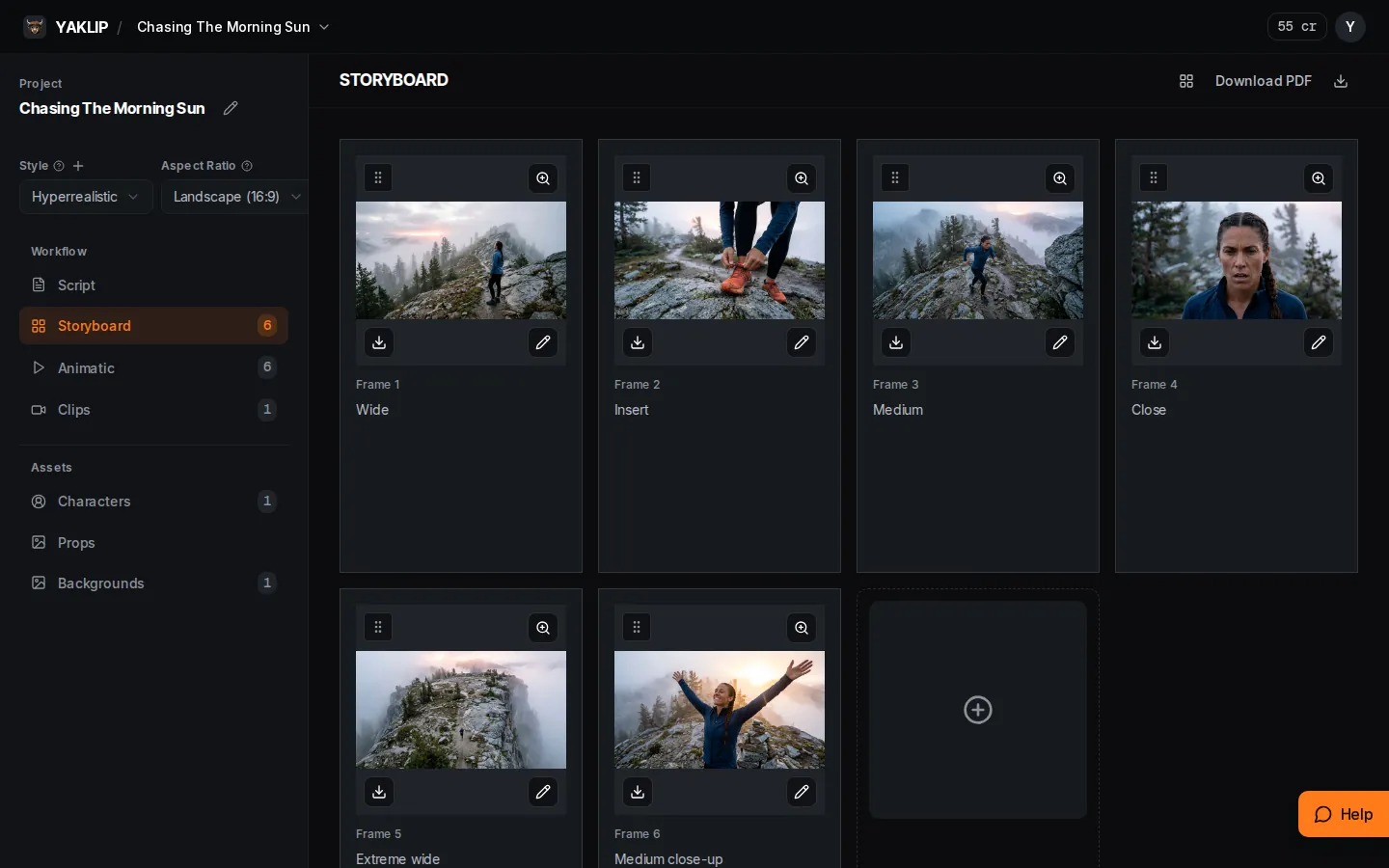
- Storyboard: generate frames and choose the takes you want.
- Clips: animate selected frames with an image-to-video model.
- Animatic: arrange the frames and adjust still durations.
- Export: use Download PDF for a board or Export MP4 in Animatic for a timed video.
What does Yaklip not do yet?
On /start, Make my video animates a Story or Ad board and exports an MP4 after you review the estimate and spend limit. You can arrange frames, set still durations and export an animatic MP4 with simple cuts and a selected voiceover, up to 60 frames or 3 minutes. Free: 720p with a small Yaklip mark. Paid: 1080p without a mark. No music or transitions. For further editing, export to CapCut, Premiere, DaVinci or any editor. (as of November 2026.)
What does it cost?
120 signup credits once per person for eligible accounts. The monthly reset never lowers a free balance: leftover signup credits are kept, and a balance below 20 is topped up to 20, only if you received the signup grant. Aliases, temporary emails and device or network limits can prevent free credits. A human check is required before spending free credits. No card. Contact [email protected] if a limit is a mistake. (as of November 2026.)
| Plan | Monthly price (as of November 2026) | Credits (as of November 2026) |
|---|---|---|
| Free | $0/month | 120 credits to start, at least 20 a month after (eligible accounts) |
| Creator | $19/month | 900 credits a month |
| Pro | $39/month | 2,000 credits a month |
| Studio | $99/month | 5,500 credits a month |
Related guides
Got any questions left?
Where should I begin?
Open Quick Start, type your idea, choose a look and press Make my storyboard.
Can I make a vertical board?
Yes. Quick Start offers 9:16, 16:9, 1:1 and a 4:5 delivery guide on 3:4 images.
Do I need my own API keys?
No. Yaklip credits pay for generations. On a wide screen, open Dashboard > Your keys > Edit. On a phone, open Dashboard > Advanced > API Keys. You can use your own OpenAI, Replicate, ElevenLabs or Gemini keys on any plan; those generations cost zero Yaklip credits. Voiceover needs your own ElevenLabs key. (as of November 2026.)
Can I export a PDF?
Yes. In Storyboard, choose Download PDF and a layout.
Was this helpful?