
How do I make my first storyboard?
Quick Start turns your sentence into a storyboard with a reusable cast and locations.
Published
Updated
How long does it take to make a storyboard?
Quick Start made 6 frames from one sentence in about 75 seconds in the recorded examples. Those examples used 33–41 credits. The start page says it uses up to 61 credits, depending on the cast and locations. With a low balance, Yaklip plans a smaller board that fits, down to one cast member and one location. These are example results, not a time guarantee. (as of November 2026.)
How do I use Quick Start?
- Open /start, or edit Your idea in the Try Yaklip box on a guide, article or example and choose Start free. Signed out, you can preview your board first; sign in to keep it.
- Choose Story, then type one sentence in Your idea. Choose Ad instead for a product storyboard.
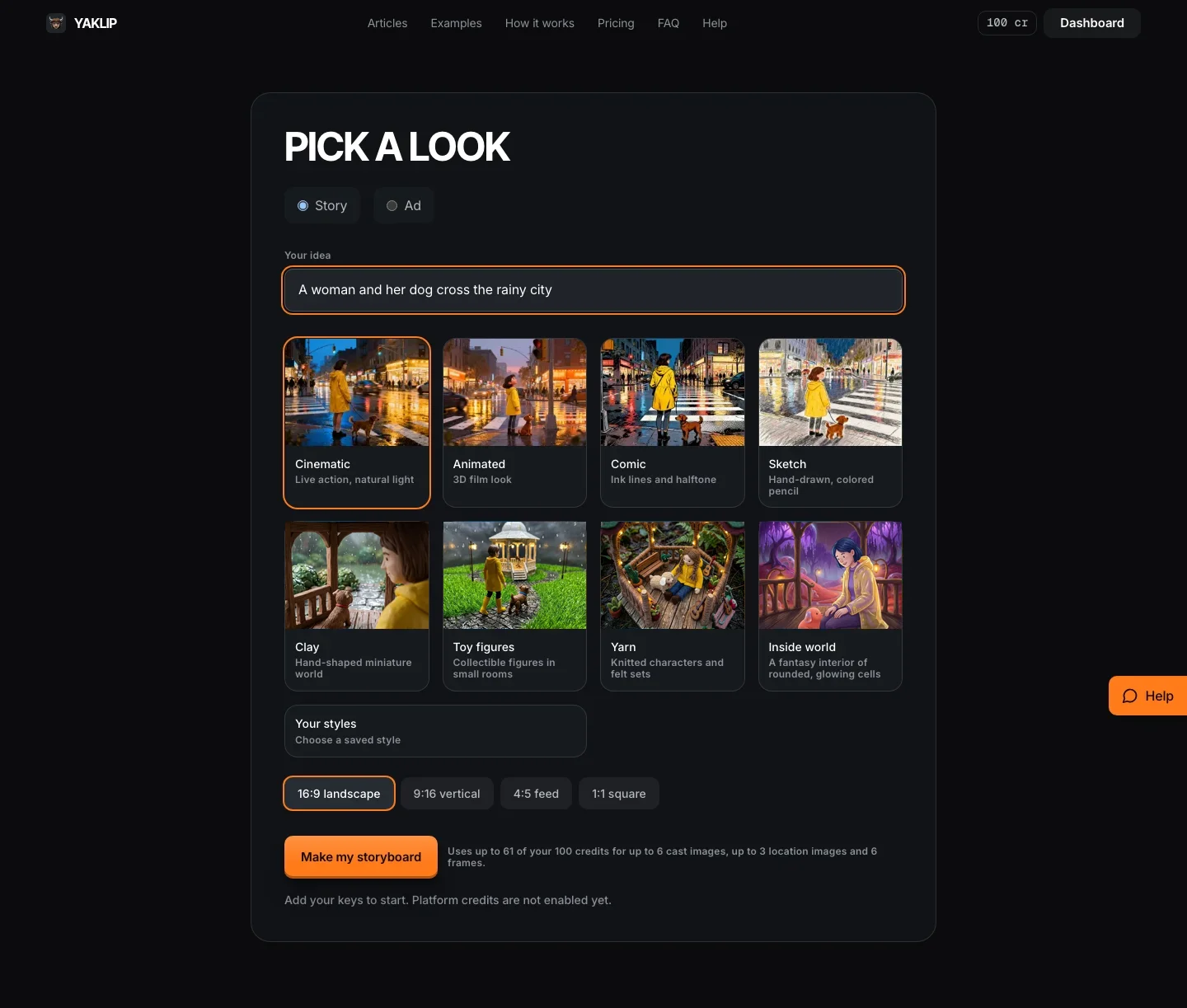
- Choose a look from the options below, separately from the story type. Inside world is available for Story only.
- Choose 16:9, 9:16, 1:1 or 4:5. The 4:5 option stores a 3:4 image with a centre crop guide; it does not crop the file.
- Press Make my storyboard. Once the shots appear, Yaklip creates the cast, locations and frames on the server. You can close the page.
- Choose Make my video on the finished board to review the estimate, set a spend limit and make an MP4. No voice is added. A voiceover selected in the editor is kept.
- Open the finished board in the editor. In Storyboard, open a frame to change it. In Clips, press Animate on a frame with no clip yet, or use the wand, labelled More options, to review settings before generating. Use Download PDF to save your board.
| Look | What you see |
|---|---|
| Cinematic | Live action, natural light |
| Animated | 3D film look |
| Comic | Ink lines and halftone |
| Sketch | Hand-drawn, colored pencil |
| Clay | Hand-shaped miniature world |
| Toy figures | Collectible figures in small rooms |
| Yarn | Knitted characters and felt sets |
| Inside world | A fantasy interior of rounded, glowing cells (Story only) |
What do I see before I sign in?
Type an idea and pick a look, then press Preview my board. Yaklip plans it on its own key and shows the title, the cast and six shot lines, next to a finished example. Looks without their own recorded example use the first example. No images or video are made yet. Previews are limited each day, so when one is not available the example alone still shows what you get.
When you sign in, that same plan becomes your Quick Start. You are not charged to plan the idea twice, and your board starts from the shots you already saw.
Can I close the page while Yaklip works?
Yes. Once Quick Start has written and saved your shots, the cast, locations and frames continue on the server. You can close the page. If you are away when it finishes, Yaklip emails you a link to the board. Return to /start without an idea query, or open your project, to see its progress. Returning reuses the same jobs.
If the run cannot finish, Yaklip saves completed images and emails you when you are away. Open the project to retry unfinished images. A problem email mentions refunded credits only when a refund has actually completed. Successful generations keep their normal charges.
What can I try?
Chasing The Morning Sun
A trail runner named Maya laces up bright orange running shoes at dawn and races up a misty mountain ridge to catch the sunrise.
Spark In The Dark
A small purple dragon named Ember is afraid of the dark, and a glowing firefly named Lumi lights her way home through the night forest.
Stormy Rescue at Sea
A retired lighthouse keeper named Walter and his loyal sheepdog Biscuit row through a storm to rescue a stranded fishing boat.
Related guides
Got any questions left?
Does Try this idea start generation?
No. It fills Your idea. You still choose settings and press Make my storyboard.
What if I am signed out?
You can type an idea, pick a look and preview your board first. Your idea is saved in a cookie and the preview is kept, so signing in does not plan or charge it again.
Can I change a frame afterwards?
Yes. Open the board in the editor and select a frame in Storyboard.
What if Quick Start stops?
The server keeps working after you leave. Return to /start without an idea query to see your latest Quick Start project. If it could not finish, open the project to retry unfinished images. Completed images are saved.
Was this helpful?