
How do I use my own API keys?
Your own API keys connect Yaklip generation to your provider accounts.
Published
Updated
Should I use my own API keys in Yaklip?
Use your own keys if you want provider billing and already manage provider accounts. Generations using those keys cost zero Yaklip credits, on every plan; your provider bills you directly (as of November 2026). Use Yaklip credits if you prefer to start without setting up provider keys. Compare your provider's charges with Yaklip credits before choosing. Voiceover requires your own ElevenLabs key.
Which key does each task use?
All new reference-file uploads for characters, backgrounds and props, whether paid with credits or using your own keys, are limited to 60 upload requests per user in a rolling hour, with up to 14 images per request and 20 MB per image (as of November 2026). If admission is temporarily unavailable, retry shortly; requests rejected before job creation do not keep reference uploads. Newly uploaded references are also removed after a confirmed job failure; successful or uncertain jobs keep their inputs, and reused images are never removed by this cleanup.
| Key | Used for |
|---|---|
| OpenAI | OpenAI images and script text tasks |
| Replicate | Replicate image and video models |
| ElevenLabs | Voiceover generation |
| Gemini | Script text tasks as an alternative to OpenAI |
Every plan can use own keys. Pro-only video models still require active Pro and Studio; the server checks plan access before billing, including with your own key.
How do I add or change a key?
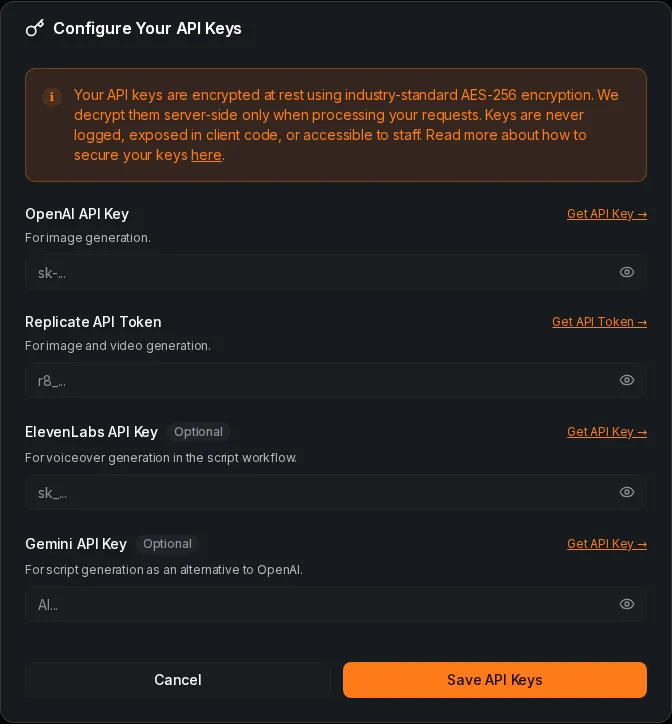
- On a wide screen, open Dashboard > Your keys > Edit. On a phone, open Dashboard > Advanced > API Keys. Both paths open Configure Your API Keys.
- Enter the key for the provider you want to use. The dialog validates a nonempty key when you leave its field. Press Save API Keys to save your entries.
- To replace a key, reopen the dialog, enter a new value and save. Already configured indicates a readable stored key. If the dialog asks you to re-enter a key, enter it again and save; generation pauses while a stored key cannot be read. Leaving a field empty keeps its stored key; it does not remove it.
This dialog has no remove-key control. Contact [email protected] if you need help removing a stored key.
How are keys stored and what if a key fails?
Keys are encrypted before storage with a key derived from the server master key and your user salt. New keys use AES-256-GCM, bound to your account and the provider field. Older encrypted keys stay unchanged when read unless the operator has enabled an encryption-key rotation. During rotation, reads migrate them to the current encryption key.
Key saves are limited to 10 requests per hour, including validation when leaving a field. An unchanged key does not need another provider validation. A rejected validation shows an invalid-key error and prevents that save. If a stored key cannot be decrypted, Yaklip asks you to re-enter it and pauses generation without charging Yaklip credits or switching to platform keys. A saved key can still fail later if the provider rejects it or the provider account has no credit. Text generation shows a generation error; a job can fail. Yaklip does not automatically switch a supplied key to Yaklip credits. Check your key and provider account, then retry.
Related guides
Got any questions left?
Do I need a paid plan for own keys?
No. Every plan allows own keys. Pro-only video models still require Pro or Studio.
Does an empty field delete my key?
No. Empty fields keep stored keys. The dialog does not have a remove-key control.
Can Yaklip credits pay for voiceover?
Voiceover requires your own ElevenLabs key.
Will a wrong key spend Yaklip credits instead?
No. A supplied provider key uses own-key billing rather than Yaklip credits (as of November 2026). Check the provider error before retrying.
Was this helpful?