
How do plans and billing work?
Your Yaklip plan sets your monthly credit allocation, project limit and access to Pro video models.
Published
Updated
Which Yaklip plan should I choose?
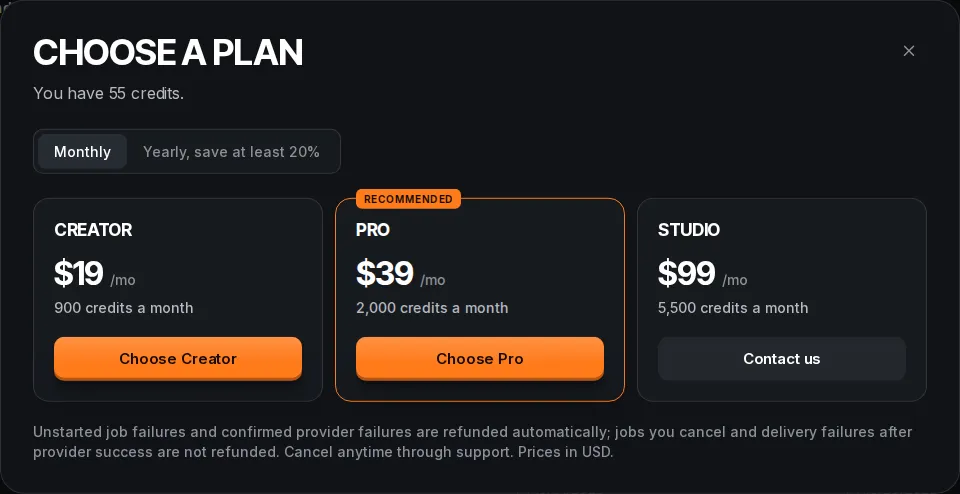
Try Free to begin. Choose Creator for more credits and projects at $19 a month with 900 monthly credits. Choose Pro for Pro video models and rollover at $39 a month with 2000 monthly credits. Contact us for Studio (as of November 2026). Use the table to compare yearly billing and project limits. If you already subscribe to Creator or Pro, contact [email protected] to change plans (as of November 2026).
What does each plan include?
| Plan | USD monthly / yearly (as of November 2026) | Credits (as of November 2026) | Projects | Pro features |
|---|---|---|---|---|
| Free | $0/mo or $0/mo billed yearly | 120 credits to start, at least 20 a month after (eligible accounts) | 2 projects | No Pro video models or rollover |
| Creator | $19/mo or $15/mo billed yearly | 900 credits a month | 5 projects | No Pro video models or rollover |
| Pro | $39/mo or $31/mo billed yearly | 2,000 credits a month | Unlimited projects | Custom styles and script guidelines; Pro video models; rollover up to 2000 unused credits (as of November 2026) |
| Studio | $99/mo or $79/mo billed yearly; Contact us | 5,500 credits a month | Unlimited projects | Pro video models; rollover up to 5500 unused credits (as of November 2026) |
Creating and using custom styles and personal script guidelines requires an active Pro or Studio plan, including when you bring your own provider keys. Saved definitions are kept if you leave the plan; upgrade through Pricing to use them again. Standard styles and shared default script guidance remain available.
Free credits are once per person and subject to email, device and network checks. Only accounts that received the signup grant receive monthly Free credits; temporary email addresses receive neither. Free spending requires an invisible human check. Contact [email protected] if a limit is a mistake. Studio is available through Contact us. All plans allow your own API keys. Free PDF and animatic MP4 exports have a small Yaklip mark; active paid plans remove it from those files.
How do I upgrade or manage billing?
- Open Dashboard, then Manage plan to open Choose a plan. Choose monthly or yearly billing.
- If your Free account has no paid subscription, or its subscription has ended after cancellation, use Choose a plan to start a new subscription. If a payment failed, open Billing and invoices to update your card, or contact [email protected] (as of November 2026). Checkout uses Stripe when configured. Choose Creator or Pro. A missing price configuration shows Available soon. Studio uses Contact us.
- If you already subscribe to Creator or Pro and want another plan, contact [email protected]. You cannot change plans through checkout or the billing portal (as of November 2026).
- If you have a billing account, press Billing and invoices in Choose a plan. The Stripe portal offers invoice history, payment method and billing address updates, and cancellation at the period end. It does not offer subscription plan changes.
What is the Creator return offer?
Some verified Free users who have never had a paid subscription receive one return offer after completing an export and spending 2 days away, within the first 7 days away. The email offers 30% off the first month of Creator monthly: USD 13.30 instead of USD 19, then USD 19 a month. Creator includes 900 credits a month and 1080p exports without the Yaklip mark. Cancel anytime. The offer lasts 7 days from the email and only works for the account that received it; yearly billing and Pro are excluded (as of November 2026).
Open Get 30% off in your email and sign in with the same account. The page shows your end date. A checkout opened before that date stays valid until its own short expiry. Used or expired offers show as unavailable; you can still see the regular plans on Pricing.
What happens when I cancel?
Cancellation is scheduled for the period end. Your paid access continues while the subscription remains active; Choose a plan shows Cancels on with the scheduled date. When Stripe reports the subscription ended, your tier becomes Free. The change keeps your current credit balance; later Free monthly resets never lower it and apply only if you received the signup grant and do not use a temporary email address (as of November 2026). See the credits guide for the rules on plan changes and rollover.
Can I buy a one-time credit pack?
Yes. If you run out of credits, you can buy a one-time starter pack of 300 credits for $9, once per account (as of November 2026). The offer appears in Choose a plan when your balance runs out, and as a line on the pricing page. Pack credits are added to your balance, never expire and are not lowered by the Free monthly reset. This is a one-time payment, not a subscription, and you cannot buy it twice.
How do I ask about a payment refund?
For a payment refund question, contact [email protected] through the Contact page. The automatic credit refund rules for failed generations are separate from payment refunds. The billing portal does not provide a payment-refund control.
How does the cost CSV handle project names?
On Usage, export your project costs as CSV. Project names that could be interpreted as spreadsheet formulas receive a leading apostrophe so they open as text. This does not rename the saved project or change numeric cost columns.
Related guides
Got any questions left?
Can I cancel without contacting support?
Yes. Open Dashboard > Manage plan > Billing and invoices and cancel in the Stripe portal.
Can I change plans inside the billing portal?
No. If your Free account has no paid subscription, or its subscription has ended after cancellation, use Choose a plan to start a new subscription. If a payment failed, open Billing and invoices to update your card, or contact [email protected] (as of November 2026). Checkout cannot change an existing subscription. If you already subscribe to Creator or Pro, contact [email protected] to change plans (as of November 2026).
Does Studio have a checkout button?
No. Studio uses Contact us.
Does cancellation immediately end my paid access?
No. Cancellation is scheduled at the period end; paid access continues while the subscription is active (as of November 2026).
Was this helpful?